 EN


















14 November 2026 · Jakub M.
How fast is the internet on our Macs: almost 900 Mbps both ways
We measured the connection directly on a rental Mac in Prague. Speedtest showed 895 Mbps download, 899 Mbps upload and 3 ms latency.
When you rent a Mac for AI work, the chip and memory are not the whole story. Models weigh tens to hundreds of gigabytes, and data has to get in and out. So we measured the connection directly on one of our Mac Studios in Prague, over remote desktop, the same way a renter uses it.
The result
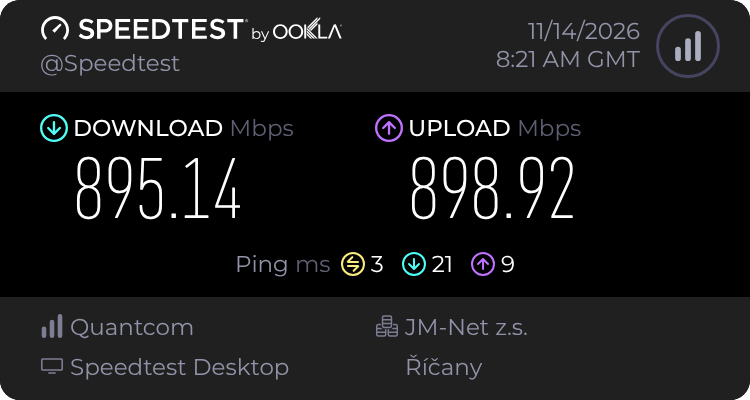
Speedtest measured 895 Mbps download and 899 Mbps upload. Latency was 3 ms when idle, 21 ms during a full download and 9 ms during a full upload. The test server was near Prague.
What it means in practice
Downloading models. At almost 900 Mbps, 100 GB takes about 15 minutes in theory. The 4-bit Qwen3.5 397B model we tested is about 224 GB, so roughly 33 minutes. In reality the server you download from matters too, and more distant servers tend to be slower.
Uploading. The connection is symmetric, so results, model checkpoints or API responses go out as fast as data comes in.
Latency under load. Even during a full download, latency only rose from 3 to 21 ms. The line does not clog up, so a terminal or remote desktop stays usable while a large download runs in the background. Latency between you and the Mac depends mainly on how far from Prague you are and on your own connection.
What to keep in mind
Our Macs in Prague share one 1 Gbps line. If two renters download at full speed at the same moment, they split the bandwidth. Transfers between your computer and the Mac are also limited by your own connection.
This is a single measurement, not long-term statistics or a guarantee. We will keep measuring, including a real download of a large model.
Try it yourself
You can rent the Mac Studio M5 Ultra with 256 GB from a single day and check the speed yourself.